
Samsung Galaxy S26 FE USB Driver & Smart Switch Download
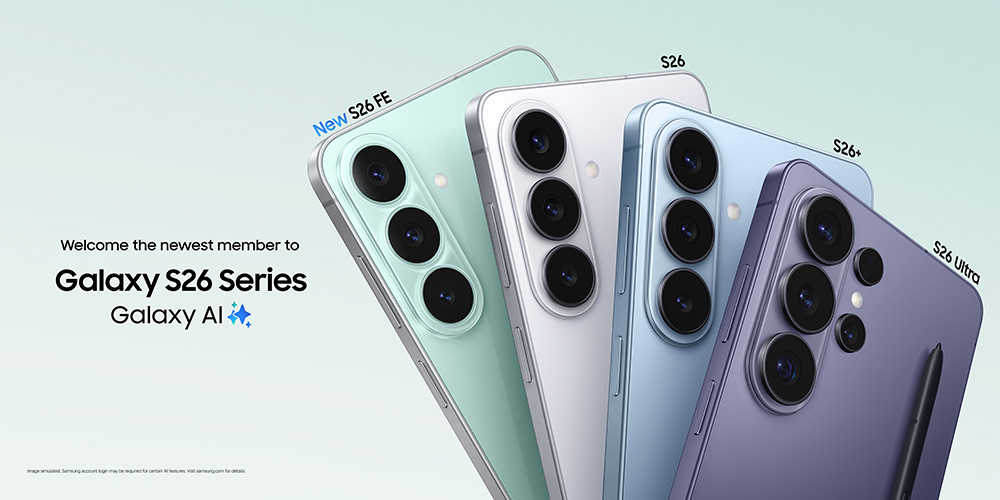
The Samsung Galaxy S26 FE was announced for the U.S. market in August 2026 and launches with One UI 9. If your Galaxy S26 FE is not detected by Windows 11, does not appear in File Explorer, is not recognized by Smart Switch, or you want to create a local phone backup before moving data, the downloads and troubleshooting steps below can help.
For normal users, Samsung Smart Switch is the most useful PC utility because it can transfer supported content and create or restore a phone backup. Samsung also provides a separate Samsung Android USB Driver for Windows, but Samsung describes that package primarily for developers who need to connect a Samsung Android device to a Windows development environment over USB.
The buttons below use direct Samsung download endpoints. The Smart Switch Windows and Mac endpoints return downloadable installer files, while the Android USB Driver button uses Samsung Developer's official download endpoint for version 1.9.5.0.
Table of Contents
- Samsung Galaxy S26 FE Driver & Smart Switch Download
- Which Download Should You Use?
- Samsung Galaxy S26 FE Driver for Windows 11
- Samsung Galaxy S26 FE Driver for Windows 10
- How to Install Smart Switch
- How to Install Samsung USB Driver
- Backup & Transfer Galaxy S26 FE Data
- Samsung Galaxy S26 FE Specifications
- Galaxy S26 FE, MDM Software & Mobile Device Management
- Samsung Galaxy S26 FE Troubleshooting
- Frequently Asked Questions
Samsung Galaxy S26 FE USB Driver & Smart Switch Download
There is no single model-specific Windows driver package that every Galaxy S26 FE owner needs to install. For most consumers, Windows handles normal MTP file-transfer connectivity and Samsung Smart Switch provides the main Samsung desktop backup and migration workflow. Developers can separately install Samsung's Android USB Driver for Windows.
| Software | Samsung Smart Switch |
| Platform | Windows PC |
| Main Uses | Phone backup, restore, data transfer and Galaxy migration |
| Windows Requirement | Samsung currently lists Windows 10 or later for Smart Switch PC support |
| Download Source | Official Samsung direct download endpoint |
Official Samsung download • Windows PC
| Software | Samsung Smart Switch |
| Platform | Mac |
| Main Uses | Backup, restore and transfer supported Galaxy data |
| Download Source | Official Samsung direct download endpoint |
Official Samsung download • Mac
| Driver | Samsung Android USB Driver for Windows |
| Version | v1.9.5.0 |
| File Size | 35.5 MB |
| Release Date | May 6, 2026 |
| Platform | Windows |
| Official Use | Connecting Samsung Android devices to a Windows development environment over USB |
| Download Source | Samsung Developer |
35.5 MB • Official Samsung Developer download
Which Samsung Galaxy S26 FE Download Should You Use?
| Your Goal | Recommended Download |
|---|---|
| Back up Galaxy S26 FE to a Windows PC | Samsung Smart Switch for Windows |
| Restore a previous Galaxy backup | Samsung Smart Switch |
| Transfer supported content to a new Galaxy phone | Samsung Smart Switch |
| Use Smart Switch on a Mac | Samsung Smart Switch for Mac |
| Connect a Samsung phone to a Windows development environment | Samsung Android USB Driver |
| Normal file transfer in Windows | Use MTP/File Transfer first; a separate driver may not be necessary |
If your main goal is protecting photos, contacts, messages and other supported phone data, Smart Switch functions as a practical Samsung phone backup utility. It is not a replacement for full data backup software, enterprise backup software, or dedicated secure data storage services, but it is the most relevant Samsung tool for a local Galaxy backup and restore workflow.
Prefer the official information pages?
Use these pages if you want to review Samsung's latest instructions before installing.
Samsung Galaxy S26 FE USB Driver for Windows 11
Windows 11 normally uses its built-in Android MTP support when a Galaxy S26 FE is connected for file transfer. After connecting the phone with a data-capable USB cable, unlock the phone and select the appropriate USB mode such as Transferring files if prompted.
If the Samsung Galaxy S26 FE is not detected by Windows 11, first check the USB cable, USB port and phone USB mode. Samsung's Smart Switch troubleshooting instructions also recommend using Smart Switch's Reinstall device driver option when a PC or Mac does not detect a connected Galaxy device or the MTP notification does not appear.
How to Reinstall the Device Driver with Smart Switch
- Disconnect the Galaxy S26 FE from the computer.
- Restart the phone.
- Open Samsung Smart Switch on the PC.
- Open the additional options menu in Smart Switch.
- Select Reinstall device driver.
- Confirm the reinstall.
- Reconnect the Galaxy S26 FE.
- Unlock the phone and allow the MTP/File Transfer connection if requested.
This is usually a better first step for normal users than manually forcing an unrelated third-party USB driver package.
Samsung Galaxy S26 FE USB Driver for Windows 10
Samsung's current Smart Switch troubleshooting documentation lists Windows 10 or later for the Windows PC version. If you are using Windows 10, download Smart Switch from the direct Samsung button near the top of this page.
When Windows 10 does not recognize the Galaxy S26 FE, verify that the cable supports data, try a different USB port, restart the phone and computer, and confirm that the phone's USB setting is configured for file transfer instead of charging only.
How to Install Samsung Smart Switch on Windows
- Click Download Samsung Smart Switch for Windows near the top of this page.
- Wait for the installer to finish downloading from Samsung.
- Open the downloaded installer.
- Allow Windows to run the setup if User Account Control appears.
- Complete the Smart Switch installation.
- Restart Smart Switch if requested.
- Connect your Galaxy S26 FE with a reliable USB data cable.
- Unlock the phone and approve any requested USB or data-access permissions.
What Can Smart Switch Do?
Samsung says Smart Switch can transfer supported content such as contacts, photos, messages and other file types between supported devices. The Windows and Mac desktop versions can also create a backup on a computer and restore supported content to a Galaxy device.
For users comparing best backup software, Windows backup software or PC backup software, remember that Smart Switch is purpose-built around compatible Galaxy data. A dedicated computer backup platform may cover an entire PC, cloud repository or business network, while Smart Switch focuses on supported mobile-device content.
How to Install Samsung Android USB Driver on Windows
If you actually need the standalone Samsung Android USB Driver for development, use the official Samsung Developer package listed above.
- Download Samsung Android USB Driver v1.9.5.0.
- Open the downloaded EXE file.
- Follow the installation wizard.
- Restart the computer if requested.
- Connect the Galaxy S26 FE using a data-capable USB cable.
- For development use, make sure your Android development environment and device settings are configured appropriately for your workflow.
A USB driver has system-level access. For better data security, mobile security and device integrity, use Samsung's official download sources whenever possible.
Samsung Galaxy S26 FE Backup, Restore & Data Transfer
A phone replacement or major software change is a good reason to create a backup first. With Samsung Smart Switch on a Windows PC or Mac, you can back up supported content and later restore it to a compatible Galaxy device.
Backup Galaxy S26 FE to a PC
- Install and open Samsung Smart Switch.
- Connect the Galaxy S26 FE to the computer.
- Allow access on the phone if prompted.
- Select the backup option in Smart Switch.
- Choose the supported content you want to save.
- Wait until the backup completes before disconnecting the phone.
Why a Backup Matters Before Troubleshooting
A current backup can reduce the impact of accidental deletion, factory resets or migration problems. Some users search for data recovery software only after files are lost, but modern encrypted phones can make recovery difficult or impossible in some situations. A proactive backup and good data protection strategy is generally safer than relying on recovery after the fact.
For important business files, consider a layered approach that includes a Galaxy backup plus appropriate data backup software, secure data storage and organizational data protection policies.
Samsung Galaxy S26 FE Specifications
Samsung announced the Galaxy S26 FE for the U.S. market on August 27, 2026. U.S. availability begins through select carriers on September 3 and expands through Samsung.com, carriers and retailers nationwide on September 4. Samsung lists a starting U.S. price of $699.99.
| Specification | Galaxy S26 FE |
|---|---|
| Display | 6.7-inch FHD+ Dynamic AMOLED 2X, 120Hz, up to 1,900 nits |
| Processor | Exynos 2500 (3nm) |
| Memory & Storage (U.S.) | 8GB + 128GB or 8GB + 256GB |
| Main Camera | 50MP wide with OIS |
| Ultra-Wide Camera | 12MP |
| Telephoto Camera | 8MP, 3x optical zoom, OIS |
| Front Camera | 12MP |
| Battery | 4,900mAh typical |
| Wired Charging | 45W supported |
| Wireless Charging | 15W Fast Wireless Charging |
| Software | Launches with One UI 9 |
| U.S. Colors | Pistachio, Blueberry and Graphite |
Galaxy S26 FE, MDM Software & Mobile Device Management
Business deployments have different needs from a personal Smart Switch backup. Organizations that manage many Galaxy phones may use mobile device management, MDM software or enterprise MDM solutions to enforce policies, manage apps, control access and support device lifecycle administration.
Smart Switch is not an enterprise MDM platform. If your company is trying to compare MDM software for a fleet of Galaxy S26 FE devices, evaluate the management platform's Android Enterprise and Samsung compatibility, enrollment method, compliance features, remote administration, mobile security, data security and data protection capabilities.
For an individual Galaxy S26 FE owner, however, installing enterprise MDM software is usually unnecessary. Smart Switch and the normal Windows/Mac connection workflow are the relevant tools for backup and transfer.
Samsung Galaxy S26 FE Troubleshooting
Galaxy S26 FE Not Detected by PC
- Unlock the phone before connecting.
- Use a USB cable that supports data, not charging only.
- Try another USB port.
- Avoid an unreliable USB hub.
- Restart the phone and computer.
- Check the phone's USB mode.
- Open Smart Switch and use Reinstall device driver.
Samsung S26 FE USB Not Recognized
If Windows reports an unknown USB device, disconnect the phone and reconnect it after restarting both devices. Try another cable and USB port before installing additional software. A damaged or charge-only cable is a common reason a phone charges but never appears for file transfer.
Smart Switch Does Not Recognize Galaxy S26 FE
- Check that Smart Switch is current.
- Reconnect the phone with a data-capable cable.
- Allow the MTP connection on the phone.
- Use Smart Switch's Reinstall device driver option.
- Restart Smart Switch.
- If possible, test another USB port or computer.
Galaxy S26 FE Only Charges When Connected to PC
Open the Android USB notification on the phone and select the file-transfer option when available. If no file-transfer option appears, test another USB cable because many cables provide power without supporting data.
Smart Switch Installation Error
Samsung's support documentation notes that Smart Switch installation problems can occur when the computer does not meet requirements or when a software component is damaged. Restart Windows, install available updates, remove the old Smart Switch installation and download a fresh installer directly from Samsung.
Should You Use Third-Party Data Recovery Software?
Third-party data recovery software may advertise recovery of photos, messages or documents, but recovery success depends on storage encryption, overwriting, backups and the specific data-loss scenario. Do not assume any tool can recover permanently deleted data from a modern encrypted Galaxy phone. Create regular backups whenever possible.
Frequently Asked Questions
Where can I download the Samsung Galaxy S26 FE USB driver?
Use the Samsung Android USB Driver button near the top of this page if you need Samsung's standalone Windows development driver. The current Samsung Developer package listed here is version 1.9.5.0.
Do I need a USB driver for normal Galaxy S26 FE file transfer?
Usually not. Windows normally uses MTP for normal Android file transfers. Connect the phone, unlock it and select file transfer when prompted. The standalone Samsung Android USB Driver is primarily documented for Windows development use.
Where can I download Smart Switch for Galaxy S26 FE?
The Windows and Mac buttons near the top of this page point to Samsung's official direct Smart Switch download endpoints.
Does Smart Switch work with Windows 11?
Samsung's current Smart Switch troubleshooting documentation lists Windows 10 or later, which includes Windows 11.
Why is my Galaxy S26 FE not detected by Smart Switch?
Check the cable, USB port, MTP permission and phone unlock state. Samsung also recommends Smart Switch's Reinstall device driver function when a connected device is not recognized.
Can Smart Switch back up my Galaxy S26 FE?
Yes. The desktop version can back up supported Galaxy content to a Windows PC or Mac and later restore supported content.
Is Samsung Smart Switch the same as backup software?
Smart Switch is a Samsung migration and backup utility for supported mobile content. General backup software or data backup software may instead protect a full computer, server, cloud repository or broader business environment.
Is Smart Switch an MDM solution?
No. Smart Switch is not enterprise mobile device management. Companies deploying many phones typically evaluate dedicated MDM software and MDM solutions for policy enforcement, enrollment and device administration.
Final Thoughts
For most Galaxy S26 FE owners, Samsung Smart Switch is the best official Samsung desktop download to start with. It supports common migration, backup and restore tasks and can also help reinstall the Samsung device driver when a PC does not recognize the phone correctly.
The standalone Samsung Android USB Driver v1.9.5.0 is available directly from Samsung Developer, but Samsung positions it mainly for Windows development environments. Ordinary users should first try the built-in Windows MTP connection and Smart Switch.
For business fleets, Smart Switch should not be confused with enterprise mobile device management. Organizations should evaluate appropriate MDM software, MDM solutions, mobile security, data security and data protection requirements separately.
This website is an independent informational resource and is not affiliated with Samsung Electronics. Samsung, Galaxy, Smart Switch, Windows, macOS, Android and related product names are trademarks of their respective owners.
The download buttons on this page point to official Samsung or Samsung Developer download endpoints. Software versions, availability, system requirements and compatibility can change over time. Always confirm the software source and create an appropriate backup before making important changes to a device.

Post a Comment for "Samsung Galaxy S26 FE USB Driver & Smart Switch Download"
Post a Comment